
Idea for widget mostly taken from PoE-Leveling-Guide (Didn't see a poe2 version, and my computer struggles with ahk for some reason)
This widget tracks and compares your current level to the current area's monsters level to track what experience multiplier you have.
Requirements
This feature requires reading the game's log file (Client.txt) to detect when the player character levels up and when they enter a new area (+ the monster level for that area)
Client.txt contains debugging information and chat, for this we use the chat portion since it shows in chat "player is not level XX" and "Entering zone XXX". No portion of the log file is saved via EE2, just reads line by line and discards the line after updating the overlay.
Background
Specific numbers related to XP are based on data gathered by the speedrunner CrimsonCasts(twitch)
In PoE2 you gain experience by killing monsters. The experience gained is based on how much experience the monster grants as a base times a multiplier based on a formula which factors in the player's level and the monster's level.
The player gains 100% of the experience for killing a monster given they have close enough player level to the monster's level. This area can be considered the "safe zone". The safe zone formula is the same as in PoE1, but it is set to 0 if the player level is greater than the monster's level.

SafeZone = \begin{cases}
  \lfloor 3 + \frac{PlayerLevel}{16}\rfloor & PlayerLevel \leq MonsterLevel \\
  0 & PlayerLevel > MonsterLevel
\end{cases}
When the player is outside of the "safe zone" the experience gained is reduced by a percentage based on some formula. EE2 follows a formula somewhat similar to PoE1 but that models data gathered by CrimsonCasts a bit closer than the PoE1 formula. Levels over 70 may be inaccurate since those start having special XP multipliers in PoE1 and since they haven't been testing in PoE2 yet, they haven't been implemented.
Settings
To use this widget you must allow reading of the game log file, as mentioned above. This is in the settings tab labeled "Leveling":

If the widget doesn't automatically start working after changing this setting, check the "Debug" section in settings for any errors. The most common problem will be not finding the log file, in which case the log path may need to be manually set.
The other setting will hide the XP multiplier if that is too much information.

Usage
To open, click the "XP" button on the main overlay window.

This will open the widget at the bottom of the screen, next to the abilities panel in the PoE2 UI. This widget is pinned, so it will stay visible even when the main overlay is closed, just like the stopwatch widget.
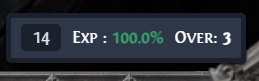
- Left most number is the current player level
- This will auto update when leveling up
- It can be manually set by selecting and typing in the current player level
- Or by clicking and using scroll wheel, like all other number input fields
- The middle item "Exp" is the current experience multiplier
- The right most number is the number of levels over the "ideal" player level for this zone
- Ideal player level is basically the lowest player level vs the current monster level without getting any XP penalties
The overall goal would be to keep the "Exp" multiplier at 100% to not lose out on any XP. This boils down to just always staying in the safe zone.
To take it a step further, try to stay where "Over" is always at 0 or 1. This means the player gains the most possible XP for the current player level, without losing any via the XP penalty. The example would be, the player is at level 14 in a level 14 zone, and a monster killed gives them 100 XP, this is "Over" of 3. If that same level 14 player were in a level 17 zone, "Over" of 0, the player would still be getting 100% of the XP, but each monster kill would give maybe 160 XP instead of 100 (fake numbers here). This ensures getting the most XP possible, while not losing out on any, with the only downside being always underleveled so the content is generally more difficult.